Setting up a new computer is bliss — no old, unused apps and the machine performs much better than the previous. Unfortunately, you may encounter new problems based on the new hardware. One such issue I encountered with my new MacBook was a “This video format is not supported” message when I went to YouTube TV.
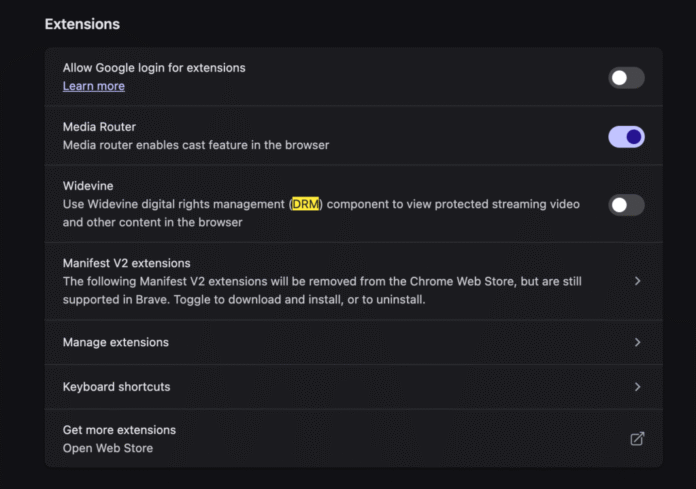
Not being able to watch my favorite live show is a real problem. After a bit of research, I found the solution to the “This video format is not supported” error message. To solve this problem:
- Open your browser settings and do a search for
DRM - You should see reference to
Widevine, a form of DRM - Enable this
Widevinesetting - Restart your web browser
Enabling Widevine within your browser will make your YouTube TV video feed work properly. Better than needing to install a codec like the good old days, right?



5 Awesome New Mozilla Technologies You’ve Never Heard Of
My trip to Mozilla Summit 2013 was incredible. I’ve spent so much time focusing on my project that I had lost sight of all of the great work Mozillians were putting out. MozSummit provided the perfect reminder of how brilliant my colleagues are and how much…

5 HTML5 APIs You Didn’t Know Existed
When you say or read “HTML5”, you half expect exotic dancers and unicorns to walk into the room to the tune of “I’m Sexy and I Know It.” Can you blame us though? We watched the fundamental APIs stagnate for so long that a basic feature…


HTML5 Input Types Alternative
As you may know, HTML5 has introduced several new input types: number, date, color, range, etc. The question is: should you start using these controls or not? As much as I want to say “Yes”, I think they are not yet ready for any real life…
Source link